
Q . I want different rapid trigger settings for each game
A . In the app version profile system, key customization and lighting settings can currently be saved.
A . Rapid trigger values can be configured per profile only in the web version.
Download
This page collects Mercury 65 driver information, setup paths, and the latest update notes.
Recommended for first-time Mercury65 users who want rapid trigger functionality in the app version.
Recommended for experienced users who want advanced settings such as profile-based trigger configuration and SOCD features.
To use the web driver (BETA), please update to the latest firmware using the button below.
Instructions for firmware updates are available on the official STORIA Discord.
Please join the official STORIA Discord for guidance on how to use the web driver.
Because this is a BETA version, unexpected issues may occur after firmware updates.
2024/9/23 STORIA_Installer_V2.06.01
2024/12/03 STORIA_Installer_V2.06.03
Further updates are planned, including support for the web driver.
Announcements will be posted on the official X account, so please follow it for updates.
Security warnings may appear during download or installation, but the file is safe.
Some security software may prevent the driver from launching correctly.
Please lower the security level or add an exception if needed.

Rapid trigger will not work until the setting is configured in the app.
Video area coming soon.
Q . I want different rapid trigger settings for each game
A . In the app version profile system, key customization and lighting settings can currently be saved.
A . Rapid trigger values can be configured per profile only in the web version.
Q . The light I configured does not turn on after restarting my PC
A . Reactive lighting such as ripple effects and custom lighting may fail to activate after a restart.
A . If you launch the driver and click the lighting settings section, the lights should turn on normally again.
A . When using custom lighting, we recommend assigning a custom-light shortcut key in key customization.
Q . Keys are input automatically, or some keys do not register
A . We recommend running key calibration on Mercury65 during initial setup, after changing rapid trigger settings, after changing the polling rate, and after updating firmware.
A . If the keyboard seems faulty, please run calibration first and confirm whether it behaves normally.
A . Depending on your PC environment, the keyboard may not behave correctly at 8000Hz polling rate.
A . In that case, we recommend lowering the polling rate to 4000Hz, 2000Hz, or 1000Hz. The default setting is 8000Hz.
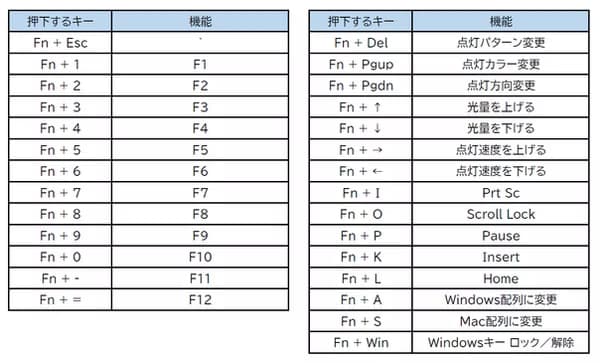
Q . Why does pressing the Fn key make the lighting turn white?
A . When the Fn key is pressed, the shortcut keys assigned to the Fn layer light up white.
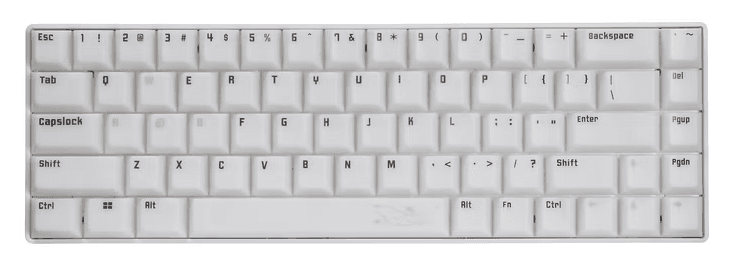
A . The default assigned keys are shown below.
Q . Symbols are not being typed as printed on the keycaps
A . Your OS may be configured for a Japanese layout. Since Mercury 65 is an English-layout keyboard, please change the Windows keyboard setting to English Keyboard (101/102 key).
A . A PC restart is required after making the change.
Q . Does it support hot swap?
A . STORIA Mercury 65 supports hot swap.
A . It is compatible with KS-20 series magnetic switches.
A . However, the current driver allows rapid trigger adjustments only in 0.1 mm units, so finer 0.01 mm tuning for higher-spec switches is not yet supported.
A . If there is progress in the future, we will announce it on social media and the website.